Three Ways to 3D Scan: Photogrammetry, LiDAR, and Dynamic Scanning. Which One to Choose?
Photogrammetry, static LiDAR, and dynamic scanning differ in accuracy, looks, and cost. See which method to choose for digital twins, VR, PC apps, and the web.
By Aleksander Caban · Co-founder, Carbon Studio
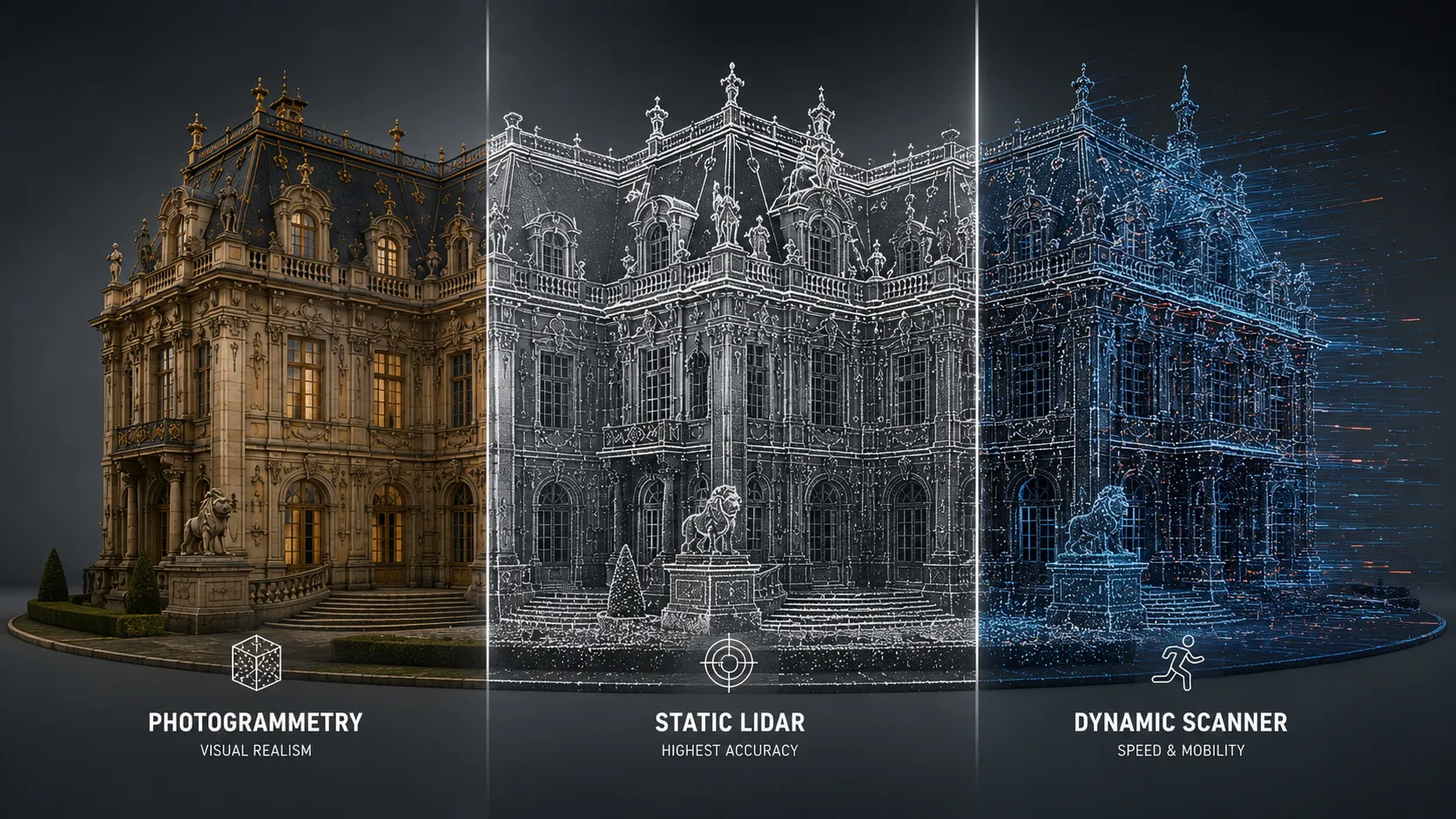
More and more companies, institutions, and design teams are asking the same question today: “We need a digital model of our building, hall, object, or space. What’s the best way to do it?”
At first glance the answer seems simple: you need a 3D scan. In practice, it quickly turns out that “3D scan” can mean several completely different methods. Most often we talk about three approaches: photogrammetry, static LiDAR scanning, and dynamic mobile scanning.
Each of these technologies can lead to a similar outcome: a digital representation of a real place. But they differ in accuracy, appearance, cost, turnaround time, data size, and what the final model is best suited for.
This matters especially when the scan is later meant to be used in a VR application, a digital twin, a training simulator, a web app, a sales presentation, a PC simulator, or an Unreal Engine or Unity environment.
Three methods, one goal
Photogrammetry, static LiDAR, and dynamic scanning all answer the same need: how to bring a real object into the digital world. But they do it in different ways.
Photogrammetry uses photographs. Static LiDAR uses precise laser measurement from several stations. A dynamic scanner collects data on the move, as the operator walks through the space with the device.
The simplest way to put it:
- Photogrammetry best shows how something looks.
- Static LiDAR best measures where something exactly is.
- A dynamic scanner most quickly shows how a space is organized.
It’s a simplification, but it captures the core difference between these methods very well.
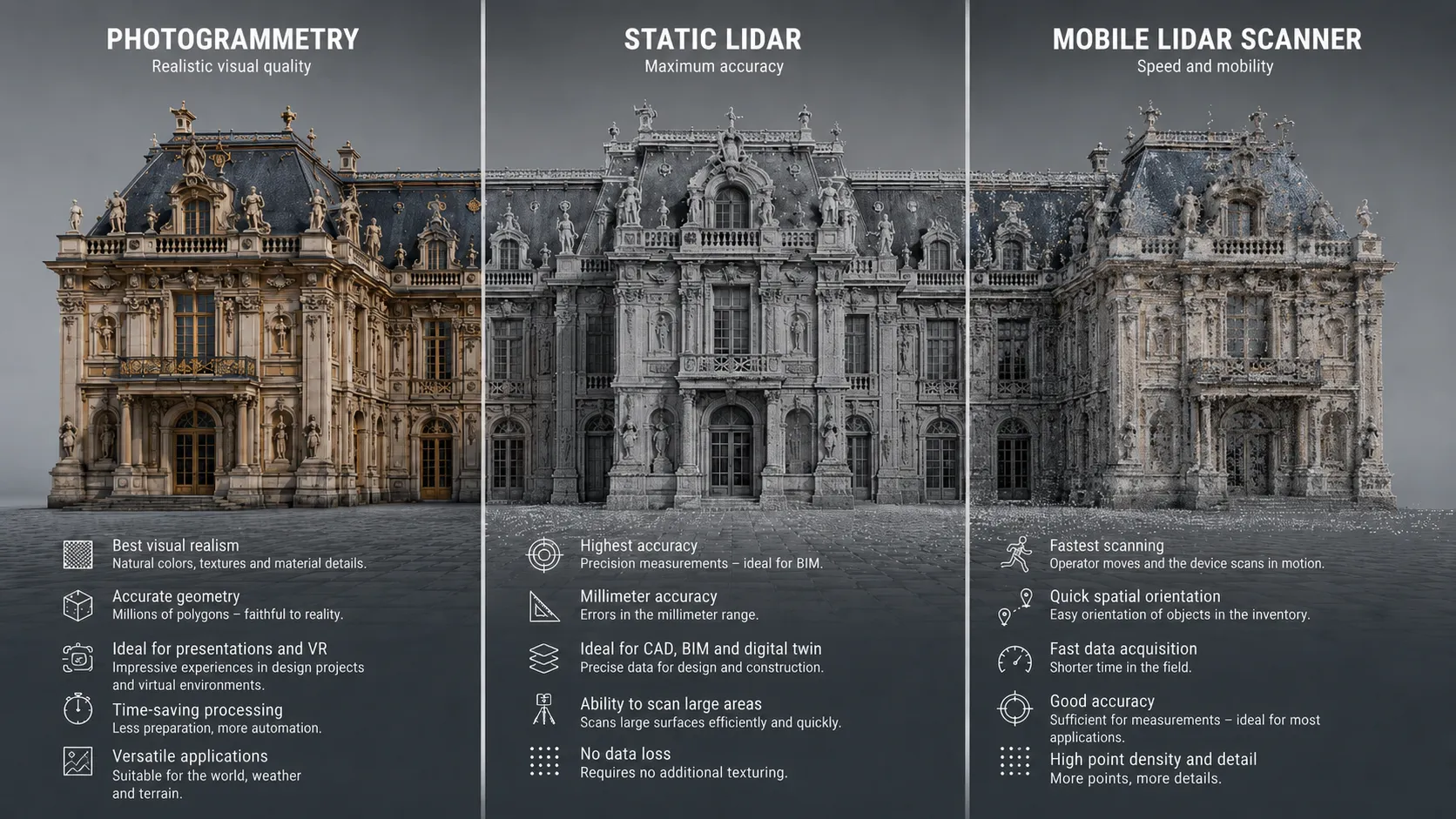
Three methods, one comparison: photogrammetry favors visual realism, static LiDAR favors measurement accuracy, and a mobile scanner favors speed and mobility.
Photogrammetry. Best when looks matter
Photogrammetry relies on taking a large number of photos of an object or space from different angles. Specialized software then analyzes the photos, finds common points, and builds a textured 3D model from them.
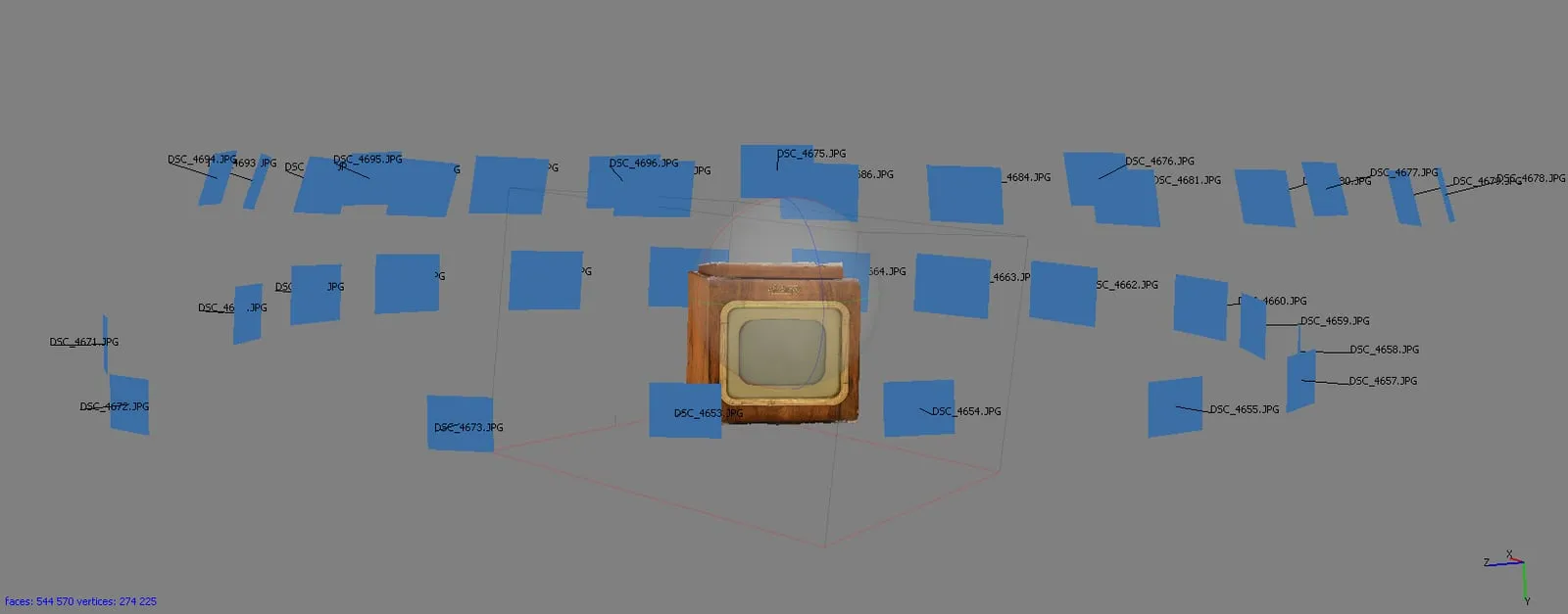
This is photogrammetry behind the scenes — our working file from a scan of a vintage television. Dozens of photos taken around the object, from which the software reconstructs geometry and textures (already 274k vertices here).
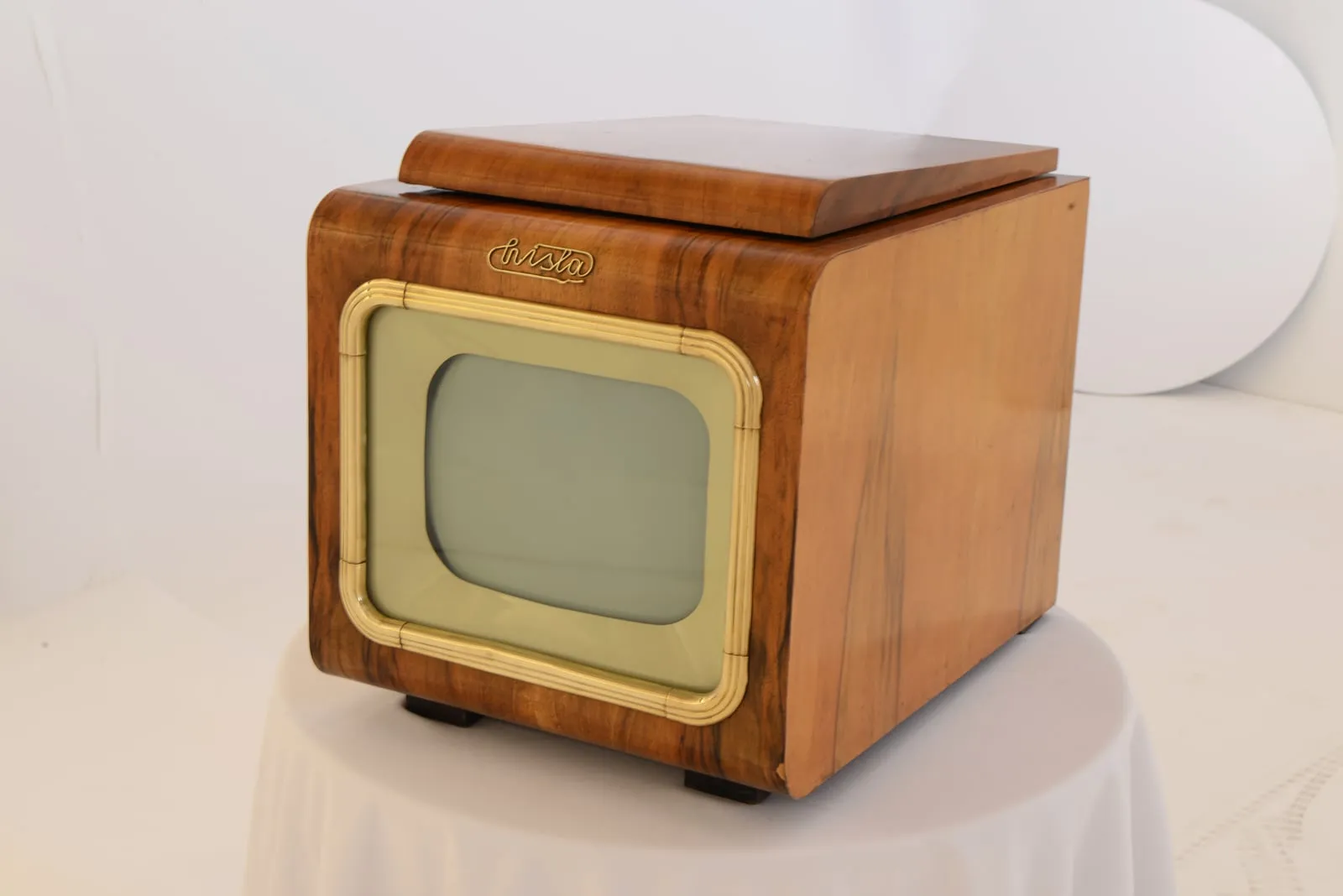
The end result: a realistic model of the same television. Photogrammetry captures wood grain, color, and detail beautifully — exactly what this method does best.
The biggest advantage of photogrammetry is visual realism. Well-done photogrammetry can wonderfully convey color, texture, dirt, wear, material detail, and the overall character of an object. That’s why it is often used to digitize heritage objects, sculptures, architectural elements, rocks, interiors, props, set pieces, or natural surfaces.
For someone new to the subject, a museum is a good example. If we want to bring an old sculpture, a wooden door, a fragment of ruins, or a building facade into the digital world and we want them to look realistic, photogrammetry will be a very good choice.
In Carbon Studio we did exactly this kind of project. For the Museum of Technology and Industry NOT in Warsaw we digitized, among other things, a 1935 Sokół 1000 motorcycle — together with its sidecar and every construction detail. It’s an exhibit you can’t drop into a web app or a training simulator without an accurate scan first.
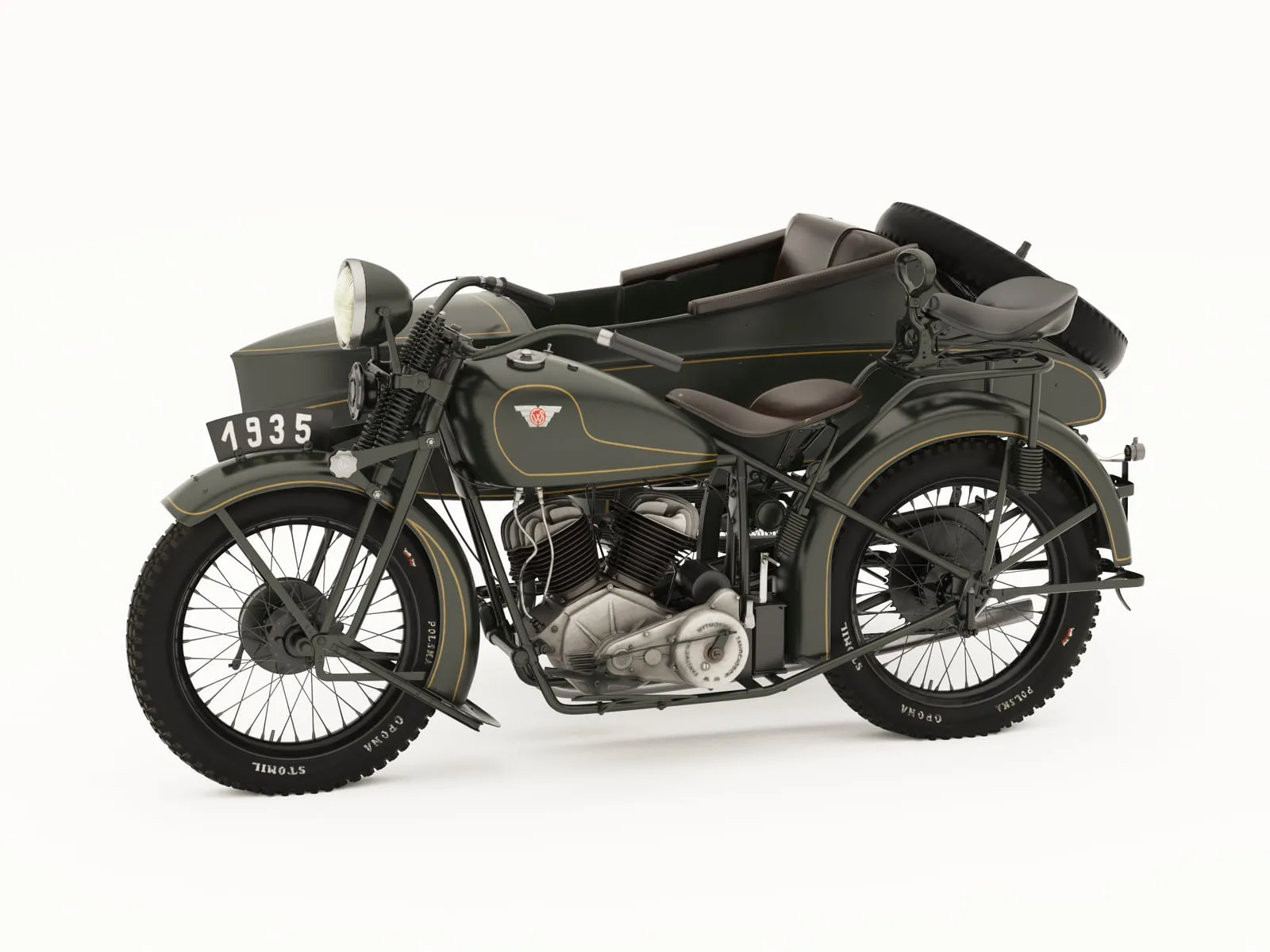
The Sokół 1000 motorcycle (1935) — our scan for the Museum of Technology and Industry NOT in Warsaw. With exhibits like this, realism is what counts: paint, chrome, leather texture, and every part of the mechanism.
In VR, photogrammetry works great as a source of realistic assets and locations. You can use it to create a believable interior, a fragment of a city, terrain, a museum object, or set pieces. Keep in mind, though, that a raw photogrammetry model can be very heavy. It can have an enormous polygon count and very large textures. To run smoothly in VR, it has to be heavily optimized.
For web applications photogrammetry can also work, but it usually requires even greater data reduction. A model for a website has to be light, load quickly, and run on a variety of devices. You can’t just drop a raw scan onto a page and expect a good result.
For PC applications photogrammetry gives more freedom. A computer can handle heavier models than a browser or a VR headset, but optimization is still needed — especially if the scene is meant to be interactive rather than just viewed.
When to choose photogrammetry?
Photogrammetry is a good choice when you care about an attractive, realistic look. It works for visualizations, museums, heritage objects, artistic items, marketing materials, presentations, VR environments, and game assets.
It is not the best choice when measurement accuracy, technical documentation, or precise dimensional fidelity is the most important factor.
Static LiDAR. Best when accuracy matters
Static LiDAR works differently. The device is set up at specific points in the space. The scanner emits a laser beam and measures distances to walls, floors, ceilings, installations, machines, and other elements of the surroundings. After several or a dozen or so stations, a very accurate point cloud is created.
This is a more measurement-oriented than visual method. Of course, LiDAR data can later be used visually, but its greatest value is accurate geometry.
A good example is an industrial hall. If a company wants a digital model of the hall to plan a modernization, check machine positions, prepare an installation rebuild, or integrate the data with BIM documentation, static LiDAR will often be the best choice.
In digital twins, static LiDAR is a very strong foundation. It provides an accurate spatial base to which you can later connect data from building management systems, IoT sensors, service procedures, technical documentation, or operational analytics.
In VR, LiDAR is very useful if the environment has to match reality in terms of scale and layout. For example, in a training simulator for industrial plant workers, a workplace-safety course, an evacuation simulator, or an application for technical services. The user can learn in a space that corresponds to a real workplace.
The downside is that raw LiDAR data does not always look attractive. A point cloud can be very accurate but not necessarily pretty. To build a good VR, PC, or web application from it, it has to be processed. Often this requires modeling, surface reconstruction, texturing, geometry simplification, and preparing the scene for a real-time engine.
For a website, static LiDAR is usually not the final format. It can be a data source, but the end model for the web should be light and simplified. For PC applications it is very well suited, especially when the goal is analysis, technical review, simulation, or a digital twin.
When to choose static LiDAR?
Static LiDAR is worth choosing when precision, measurements, documentation, a digital twin, BIM, infrastructure, industry, technical building reconstruction, or a simulator based on a real space matter.
It is not the best if the main goal is a fast, cheap, and eye-catching marketing visualization that doesn’t need high accuracy.
Dynamic scanner. Best when speed matters
Dynamic mobile scanning means the operator moves through the space with a handheld, backpack, robotic, or mobile device. The system records the surroundings on the move and builds a model of the space.
The biggest advantage of this method is speed. You can relatively quickly walk through a building, corridors, offices, warehouses, basements, a hall, or an outdoor area and gather a general picture of the space.
It’s a very good solution when you need to quickly inventory a place, prepare a base for further work, or check the spatial layout. A dynamic scanner won’t always deliver the same accuracy as static LiDAR, but it is often enough for reference, training, pre-production, or orientation purposes.
Example: a company wants to quickly prepare a training application showing an evacuation route in a building. It doesn’t need millimeter accuracy. What matters is that corridors, stairs, doors, rooms, and the main elements are in the right place. In that case, a dynamic scanner can be a very sensible choice.
In VR, a dynamic scanner is good as a fast project start. It lets you capture proportions, layout, and the general logic of a space. The team can then rebuild the data into an optimized VR environment. It won’t always be the ideal solution for very accurate technical simulators, but it works for orientation training, virtual walkthroughs, simple digital twins, and projects where time is the priority.
For web applications a dynamic scan can be useful if it is heavily simplified. For PC applications it works better, because you can afford more data, more detail, and richer interaction.
When to choose a dynamic scanner?
Choose a dynamic scanner when time, a large area, fast inventory, an approximate building model, pre-production, a quick digital twin, or preparing a base for later modeling matters.
It is not the best choice when the project requires the highest measurement accuracy or very high visual realism.
What to choose for VR?
In VR, three things matter most: performance, scale, and spatial readability. The user has to feel they are in a believable place, but the application also has to run smoothly. This is especially important in VR headsets, where a scene that is too heavy can cause frame drops and discomfort.
Photogrammetry in VR gives a very realistic look. It is great for museums, reconstructions, tourism, architectural presentations, set pieces, and objects the user views up close. The downside is data weight. Photogrammetry models almost always require retopology, geometry reduction, texture optimization, and LOD preparation.
Static LiDAR in VR gives very good fidelity to the real space. It’s an excellent base for training, industry, simulators, technical procedures, evacuation simulations, and digital twins. The downside is that the data has to be transformed into an attractive and efficient environment. The point cloud alone is rarely enough as a finished VR application.
A dynamic scanner in VR is good when you need to quickly reproduce a space and prepare a prototype. It works in projects where room layout, orientation, passages, and the general logic of a place matter. The downside can be lower accuracy and lesser detail quality.
In practice, a hybrid approach is often best for VR. LiDAR or a dynamic scan provides geometry and scale, while photogrammetry supplies selected realistic elements, textures, or objects.
What to choose for a website?
On a website, lightness, loading speed, and accessibility matter most. The model should work in a browser, on a laptop, a tablet, and sometimes a phone too. That’s why it shouldn’t be too heavy.
A simplified, optimized 3D model is best suited for the web. It can be built from photogrammetry, LiDAR, or mobile scanning, but the end result should be prepared specifically for the page.
Photogrammetry can deliver a very nice product model, a museum object, or a fragment of space to view online. Watch out for texture weight, though.
LiDAR can be good as a base for an architectural or technical model, but it usually requires rebuilding into a simpler form.
A dynamic scan can be useful for quickly creating a general model of a space — for example an office, a showroom, an investment property, or a public building.
If the goal is a marketing presentation on a website, it’s often better to prepare a lighter, aesthetically refined model than to show a raw scan.
What to choose for a PC application?
A PC application offers more than a website. You can use heavier models, better materials, more advanced lighting, more interactions, and more accurate data. Optimization is still needed, though.
Each of the three variants is well suited to a PC application, but the choice depends on the goal.
- For realistic visualization, use photogrammetry.
- For a digital twin, technical simulation, or an analytical tool, static LiDAR is a better fit.
- For a fast prototype, a large space, or an orientation application, a dynamic scanner can be a good choice.
PC is also a good place for more complex digital twins that combine 3D data with operational information, sensors, training scenarios, or process analysis.
What to choose for a training simulator?
For training simulators, the choice of technology should follow the goal of the training.
If the user is to learn a procedure in a specific place — for example a hall, a machine room, a laboratory, or a public building — spatial accuracy is worth prioritizing. In that case, static LiDAR will be a very strong choice.
If the simulator is mainly meant to show the general layout of a space, a route, equipment locations, or rules of conduct, a dynamic scanner may be sufficient and more cost-effective.
If the training is about recognizing objects, materials, details, or working with a visually important element, photogrammetry may be the best complement.
Example: in a building fire-safety simulator, corridors, exits, stairs, fire extinguishers, and spatial orientation matter. A dynamic scan or LiDAR may be enough. In a simulator for servicing a specific machine, more accurate LiDAR and additional modeling work better. In a museum or educational application, photogrammetry may play a bigger role, because the user examines detail up close.
What to choose for a digital twin?
A digital twin requires long-term thinking. If the digital twin is to be a tool for managing a facility, planning changes, analysis, or integration with other systems, the data foundation has to be reliable.
The best starting point is often static LiDAR. It provides accurate geometry and is well suited to connecting with technical documentation, BIM, BMS systems, IoT, and operational data.
A dynamic scanner works when the digital twin is to be created quickly or updated regularly. It can be a good tool for periodic inventory.
Photogrammetry can be used as a visual layer, especially when the digital twin is also meant to be attractive to the end user, an investor, a client, or a visitor.
In a professional digital twin, several data sources are often combined. It’s not just about having a 3D model. It’s about making the model useful.
What affects the price?
The cost of performing a scan and preparing a finished model depends on several factors. The scanning technology itself is only part of the budget. Very often the larger cost is the later data processing.
Price is affected above all by:
- the size of the space,
- the level of accuracy,
- the amount of detail,
- access to the object,
- on-site working time,
- the number of scanner stations,
- the required level of realism,
- the target platform,
- the scope of optimization,
- the need to integrate with VR, web, PC, BIM, or data systems.
Photogrammetry can be relatively cheap for small objects, but for large spaces it becomes time-consuming. It requires good shot planning, suitable lighting, data processing, model cleanup, error fixing, and optimization.
Static LiDAR is usually more expensive at the data-acquisition stage, because it requires specialized equipment, an operator, and a precise process. But it delivers very high value where precision and the technical use of the data matter.
A dynamic scanner is often the most cost-effective for large spaces that need to be captured quickly. It can significantly shorten on-site time, but if the final model is to be highly polished visually, post-production time still has to be added.
The key point is that a scan is not yet a finished product. For VR, the web, a PC app, or a digital twin, you have to plan an additional stage: turning the data into a usable 3D environment.
Sometimes a cheap scan can turn out expensive if it later needs weeks of repair and optimization. Conversely, a more expensive, better-planned data acquisition can lower the cost of the whole production.
A simple example: the same building, three different needs
Imagine a historic building we want to bring into the digital world.
If the goal is an attractive presentation for visitors, a virtual walkthrough, or promotional material for a website, photogrammetry can deliver the best visual result. The user will see the texture of wood, stone, brick, plaster, and the detail of the facade.
If the goal is technical documentation of the building, planning a renovation, or creating an accurate digital twin, static LiDAR will be the better choice. Dimensions, geometry, cross-sections, and fidelity to reality matter more then.
If the goal is to quickly prepare an approximate model — for example for training, planning a visitor route, or an application prototype — a dynamic scanner may be the most practical. It will quickly capture room layout and spatial relationships.
It’s the same building, but three different goals. That’s why the choice of technology should always start with the question: what is this model going to be used for?
Can these methods be combined?
Yes, and very often it’s the best solution.
You can use LiDAR for accurate geometry, photogrammetry for realistic textures, and dynamic scanning for fast coverage of large spaces. This hybrid approach is especially valuable in VR, digital twin, and simulator projects, where realism, scale, accuracy, and performance all matter at once.
For example: in an industrial hall, static LiDAR can reproduce the structure, machines, and spatial layout. Photogrammetry can supply the detail of selected equipment. A dynamic scanner can help quickly update the data after changes to the facility.
From scan to finished application
The biggest mistake is thinking that a 3D scan is a finished application. It isn’t.
A scan is raw material. It can be very good, but it still needs work. It has to be cleaned, organized, optimized, and prepared for a specific platform and use case.
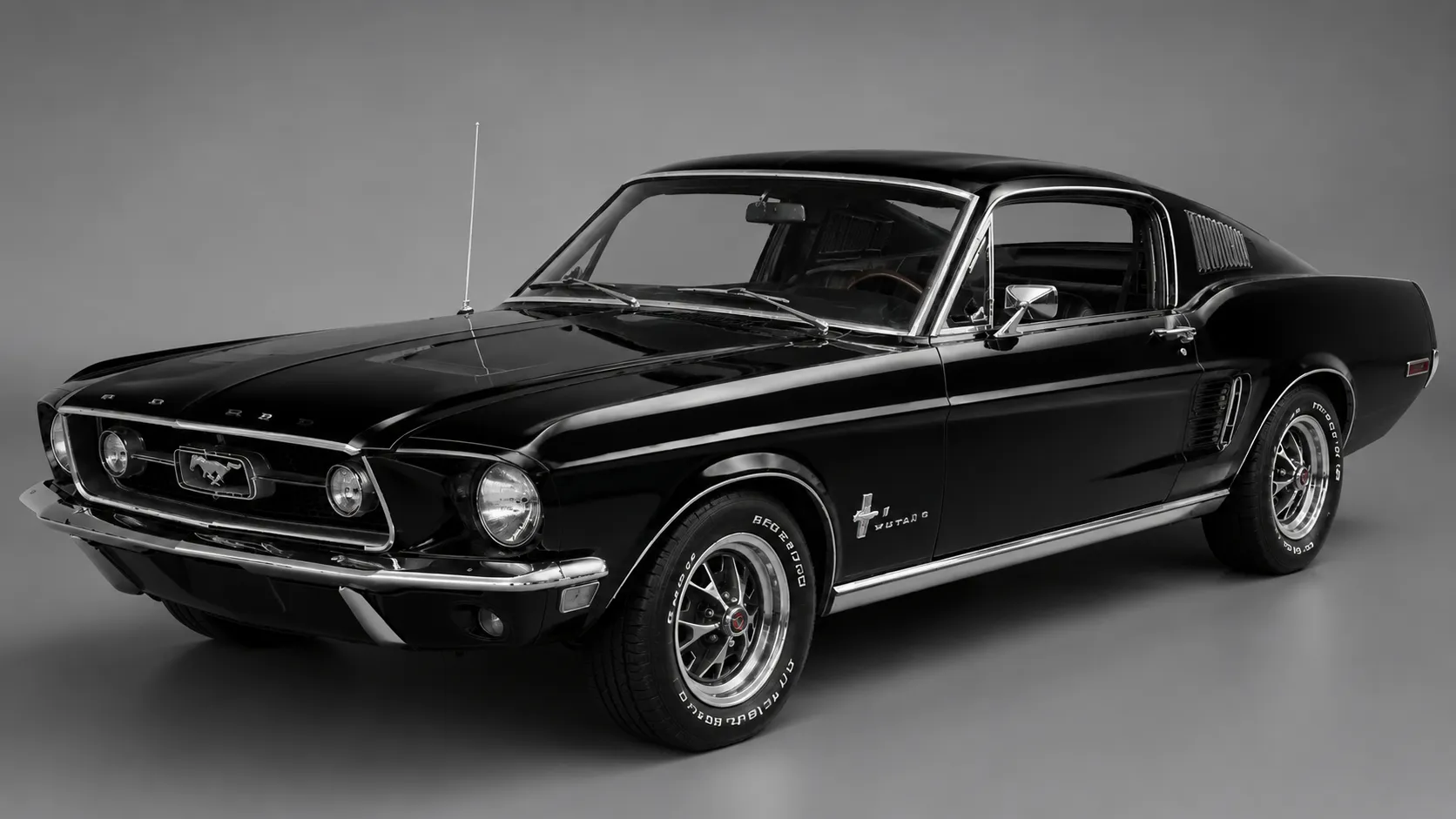
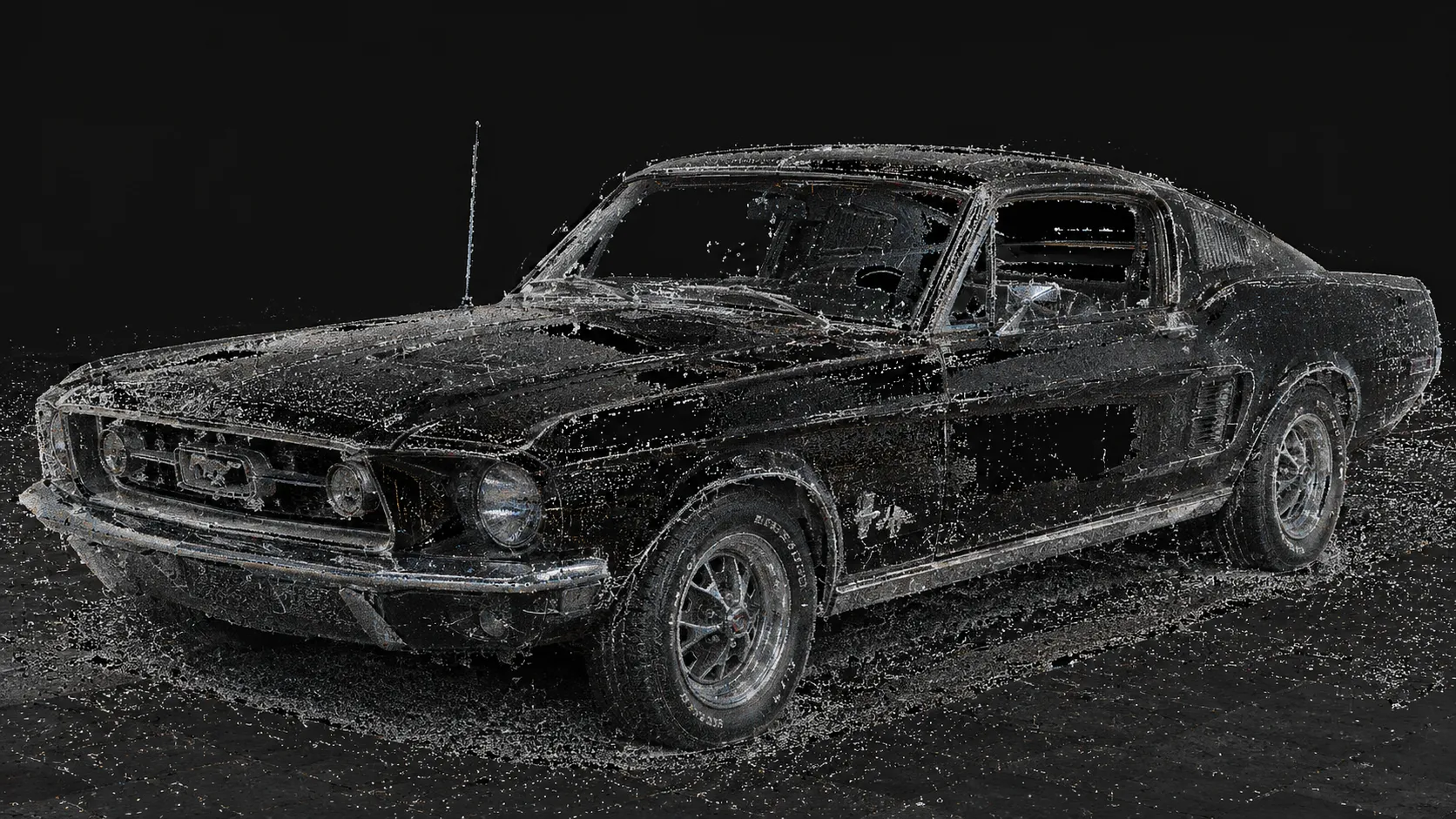
- For VR, what matters is smooth performance, scale, collisions, interactions, and user comfort.
- For a website, what matters is a light model, fast loading, and browser compatibility.
- For a PC application, what matters is functionality, visual quality, the ability to analyze, and interactions.
- For digital twins, what matters is data reliability, updates, integration with systems, and practical use of the model.
Only after this stage does a scan become something more than documentation. It becomes a tool.
Summary
Photogrammetry, static LiDAR, and a dynamic scanner are three different ways to digitize reality. None of them is “the best” in every situation.
Photogrammetry works best when looks, realism, and surface detail matter. Static LiDAR is worth choosing when accuracy, measurements, and technical data reliability matter most. A dynamic scanner is best when speed, a large space, and a practical reproduction of a place’s layout matter.
In VR, digital twin, simulator, web, and PC projects, what matters most is not just how we collect the data, but what we do with it afterward. A well-made scan is the start of the process. Only the right data processing turns it into an interactive, efficient, and usable digital environment.
At Carbon Studio, this second stage is exactly what we do — we turn 3D scans into finished VR/XR applications for business, simulators for industry, and digital twins, combining them with VR, AR, and AI technology. If you’re wondering which scanning method to choose for your project, we’re happy to help.
Key takeaways
- Photogrammetry builds a model from photographs — it captures color, texture, and detail best. Ideal for museums, heritage objects, visualizations, and game assets, but raw models are very heavy and need retopology and texture optimization.
- Static LiDAR measures the space with a laser from multiple stations — delivering the highest geometric accuracy. It is the foundation for digital twins, BIM integration, and training simulators that mirror a real workplace.
- Dynamic mobile scanning captures data on the move — the fastest way to inventory large spaces. Great for prototypes and orientation training, at the cost of accuracy and detail.
- The choice of technology should start with the question 'what will the model be used for?', not with the hardware. The same building calls for a different method for a marketing presentation, technical documentation, or a quick prototype.
- For VR and digital twins, a hybrid approach usually works best: LiDAR for geometry and scale, photogrammetry for realistic textures, and dynamic scanning for fast coverage of large areas.
- A scan is raw material, not a finished product. Only cleanup, optimization, and platform-specific preparation (VR, web, PC, digital twin) turn it into a usable tool.
Frequently asked questions
+ How is photogrammetry different from LiDAR?
Photogrammetry builds a 3D model from photographs, so it reproduces color, texture, and surface appearance well. LiDAR uses laser measurement, which makes it better wherever precise geometry and measurements matter.
+ When should you choose photogrammetry?
Choose photogrammetry when realistic appearance is the priority. It works well for heritage objects, museums, artistic items, promotional materials, game assets, and visualizations.
+ When should you choose static LiDAR?
Choose static LiDAR when accuracy is needed. It is a good fit for digital twins, BIM, industrial halls, technical documentation, measurements, and simulators based on real spaces.
+ When should you choose a dynamic scanner?
Choose a dynamic scanner when you need to digitize a large space quickly. It works well for building inventories, prototypes, orientation training, virtual walkthroughs, and fast digital twins.
+ Which method is best for VR?
For VR, a hybrid approach is often best. LiDAR or a dynamic scan gives good scale and spatial layout, while photogrammetry can supply realistic detail. Later optimization for smooth real-time performance is key.
+ Which method is best for a website?
For a website, a light, optimized 3D model is best. It can come from photogrammetry, LiDAR, or mobile scanning, but it must be simplified and prepared for the browser.
+ Can a 3D scan be used in an application straight away?
Usually not. A raw scan has to be cleaned, optimized, simplified, and prepared for a specific platform. Data is prepared differently for VR, for a PC app, for a digital twin, and for a website.
Aleksander Caban
Co-founder, Carbon Studio
Co-founder of Carbon Studio, a Polish VR game studio behind The Wizards, Hunt Together, and Warhammer Age of Sigmar: Tempestfall. Writes about XR, AI, and the craft of immersive software.