Home Tips: when XR and AI enter your home
A Technology Experiment by Carbon Studio
Introduction
At Carbon Studio, we’ve spent years building experiences in VR and Mixed Reality. Most of the time, these technologies live in games, simulations, and virtual worlds. But at some point, we started asking ourselves a different question: what if the same tools could help with everyday life, in the most obvious place of all – at home?
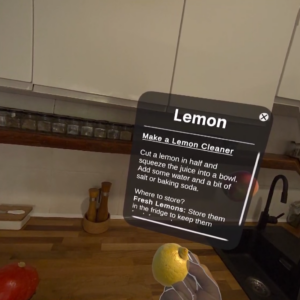
That question led to Home Tips, an XR + AI prototype designed to explore how spatial computing can support real, practical tasks. Instead of showing information on a screen, the system places guidance directly into your physical environment. Right where the problem happens. On the kitchen counter, next to a stain on the carpet, by the dishwasher, in the bathroom.
Home Tips is not about browsing tips. It’s about doing things, with help that appears exactly when and where it’s needed.
Your Home Becomes the Interface
Most household knowledge lives in articles, videos, and checklists. Useful, but always separated from the moment of action. XR changes that.
With Home Tips, the app scans your space, understands rooms and objects, and overlays instructions in real time. Arrows, markers, short explanations, and 3D animations appear directly in your home, guiding you through each step.
You don’t read instructions. You follow them in the real world.
AI That Understands Context
This is not a static library of tips. It’s a system that works with context.
AI in Home Tips:
- Recognizes objects and spaces
- Understands what you’re trying to do
- Adapts instructions to the current situation
- Remembers previous actions and improves future suggestions
- Offers help before you even think to ask
Over time, the system can learn how you use your space and how you solve problems, making guidance more accurate and more personal.
Natural Interaction, No Controllers
Home Tips is built around hand tracking. You interact with it the same way you interact with your home – by pointing, moving, and touching. No controllers, no menus to learn, no extra steps.
If XR is meant to be part of everyday life, it has to feel this natural.
Knowledge Built Together
The long-term vision for Home Tips includes a community layer. Users would be able to:
- Add their own tips
- Improve existing ones
- Rate what actually works
- Share practical knowledge
The difference is that knowledge doesn’t live as text. It lives as an XR experience attached to a real object or place. It’s closer to a shared memory of how things are done, not just another tutorial.
Where This Technology Can Go
This prototype is just the beginning. The same technology can be applied to many areas of daily life:
- Kitchen – cooking, food storage, appliances, organization
- Garage – tools, repairs, DIY
- Bathroom – cleaning, maintenance, surfaces
- Garden – seasonal work, care, equipment
- Home education – learning by doing instead of watching
- Training and onboarding – instructions in the place of work
- Facility management – offices, hotels, shared spaces
It’s one engine that can support many different worlds.
Why We’re Building This
We believe the future of XR is not about escaping reality. It’s about improving it.
And AI shouldn’t just answer questions. It should help people act, step by step, in the real world.
Home Tips is our way of exploring that future, starting from the place everyone understands best – home.
What About You?
Where do you struggle the most at home? Kitchen? Garage? Bedroom? Garden?
Where would XR + AI bring you the most value?
Key Takeaways
- XR and AI transform homes into interactive interfaces by overlaying digital guidance directly onto physical spaces
- The system learns from user behavior to provide increasingly personalized and proactive assistance over time
- Spatial computing eliminates the gap between reading instructions and taking action in real-world environments
- Home automation becomes more intuitive when guidance appears exactly where and when it’s needed most
- This technology represents the future of smart homes where your physical environment becomes the primary user interface
Frequently Asked Questions
What is Home Tips XR technology?
Home Tips is an experimental XR and AI prototype that overlays interactive guidance directly onto your physical home environment. It scans your space, recognizes objects, and displays instructions exactly where you need them instead of on separate screens.
How does AI improve home management tasks?
The AI system recognizes objects and spaces, understands your current activity, adapts instructions to specific situations, remembers previous actions, and proactively offers help. It learns your habits to provide increasingly personalized assistance over time.
Why is spatial computing better than traditional home apps?
Spatial computing places guidance directly in your environment where problems occur, eliminating the disconnect between reading instructions and taking action. You follow real-world visual cues instead of switching between screens and tasks.
What makes Home Tips different from regular home improvement apps?
Unlike static apps with generic instructions, Home Tips provides contextual, real-time guidance that adapts to your specific space and situation. It uses XR to overlay interactive elements directly onto your physical environment for immediate action.
How does XR technology work in home environments?
XR technology scans and maps your home spaces, identifies objects and rooms, then overlays digital information like arrows, markers, and 3D animations directly onto physical surfaces. This creates an augmented reality interface using your actual environment.